Scribe for lecturers
Lecture Recording with Live Captions and Study Packs
A recording on its own sits unwatched. Scribe turns each lecture into captions, summaries, quizzes and study packs that students actually use.
Why a recording alone is not enough
Most universities already record some lectures. The files go into a folder or a video page. A few students watch them the night before an exam. Most never open them. The problem is not the camera. The problem is that an hour of video is hard to search, hard to revise from and hard to follow if English is your second language.
Lecturers know this. Many spend evenings writing slides into notes, building revision quizzes and answering the same questions by email. That work repeats every term. It also depends on who has time, so students in one module get rich support and students in the next get very little.
Scribe starts from the recording but does not stop there. It treats each lecture as the raw material for everything a student needs to learn the topic and remember it. The lecturer stays in charge of what is published.
What happens during the lecture
The lecturer starts a session from the Scribe app or the classroom computer. Scribe records the audio and slides and shows live captions on screen. Each student can follow the captions on their own phone or laptop, and can switch them into their own language. A student who thinks in French or Arabic can read along in that language while the lecture runs in English.
Lecturers can open a live room for the class. They can run quick polls, check understanding half way through and collect questions without stopping the flow. Quiet students can ask a question in writing. The lecturer sees the questions grouped, so the same doubt asked ten times shows as one.
- Live captions, switchable to each student's language
- Live rooms with polls and written questions
- Recording of audio and slides in one session
- Works in a lecture theatre, a seminar room or online
What students get afterwards
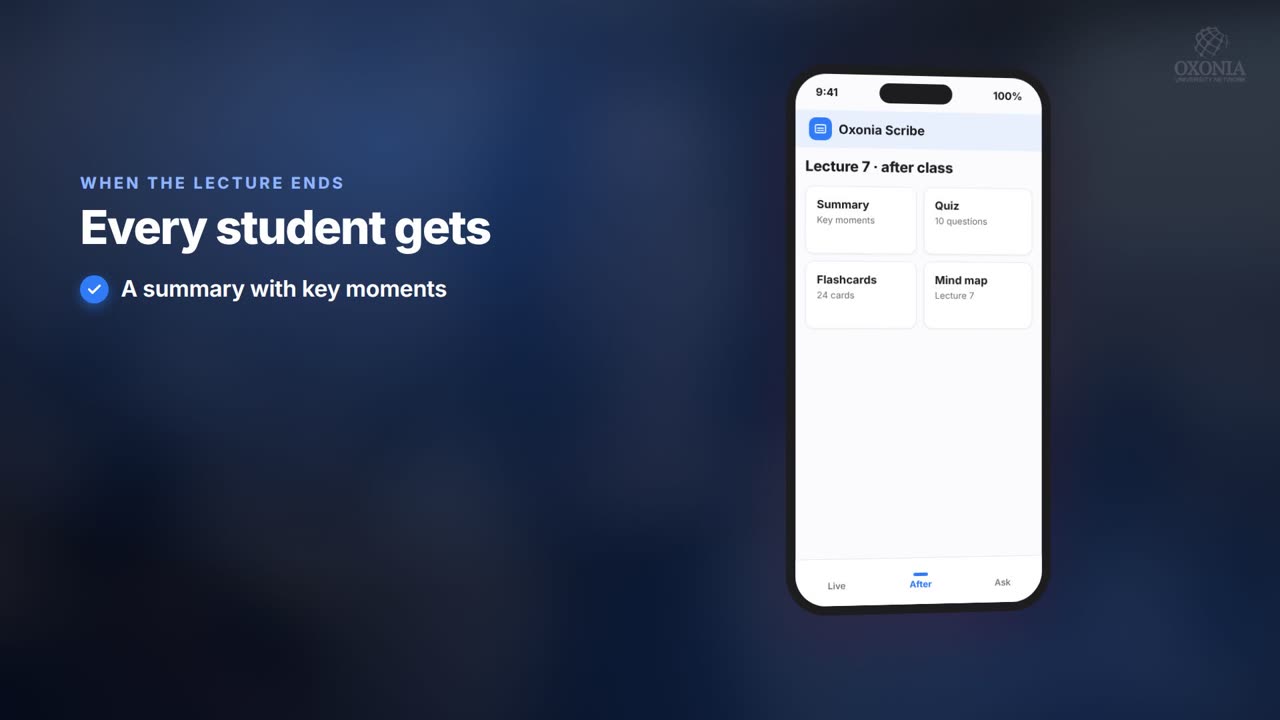
When the lecture ends, Scribe prepares a set of study materials as drafts. The lecturer can check and adjust them before release. Students then find, in one place:
- A written summary of the lecture, with key moments linked to the point in the recording
- A mind map that shows how the ideas connect
- Quizzes with spaced repetition, so questions come back just before a student is likely to forget
- A study pack for revision that gathers summaries and questions across several weeks
- An audio recap for the bus or the walk home
These are Ai enabled drafts. Every answer cites its sources in the lecture, so a student can jump back to the exact moment where the point was made. Nothing becomes official course material until the lecturer adopts it.
| Output | Best used for |
|---|---|
| Live captions | Following the lecture, including in a student's own language |
| Summary and key moments | Catching up after a missed class |
| Mind map | Seeing how topics connect |
| Quizzes with spaced repetition | Remembering material over a term |
| Study pack | Exam revision across several weeks |
| Audio recap | Review while travelling |
What lecturers and heads of department see
Class insights show which parts of a lecture students replayed, which quiz questions most students got wrong and which topics drew the most questions. A lecturer can see that week four confused people before the exam proves it. A head of department can see patterns across modules without reading every page.
The aim is not surveillance. Insights are about topics, not about catching individuals. They help a lecturer decide where to spend the next seminar. Students who want more practice can move straight into a Tutor tutorial on the same topic, and lecturers can later compare quiz results with exam outcomes in Mark.
Because Scribe sits on the same Oxonia Academy ID as the rest of the platform, the same login opens recordings, tutorials and results. Staff do not juggle passwords for each tool.
Fitting Scribe into Moodle, Canvas or Blackboard
Students should not have to learn another website. Scribe syncs with Moodle, Canvas and Blackboard, and also connects through LTI. Recordings, summaries and quizzes appear inside the course page that students already use. Enrolments come from the LMS, so the right students see the right lectures.
If your university runs more than one LMS, each faculty can connect its own. The detail is in our guide to connecting Moodle, Canvas and Blackboard. For language support, read teaching in students' own languages.
Rolling Scribe out across a faculty
Most universities start with one department. A few lecturers record a full module for a term. Students use the study tools, and the department reviews class insights at the end. That gives the faculty real evidence from its own courses before a wider decision.
The next step is usually the large first-year modules, where class sizes are highest and support is thinnest. These modules gain most from captions, quizzes and study packs. Smaller seminar courses can follow.
Set a few simple rules early. Agree which lectures are recorded and how long recordings stay available. Agree who checks summaries before release. Tell students how they may use the study tools in assessed work, and point them to the AI-use declarations in AI Hub. Clear rules make lecturers more comfortable and students more confident.
Cost and how to start
Scribe is priced by student numbers each year. It costs £24,000 for universities with up to 5,000 students, £39,000 for 5,000 to 15,000 and £58,000 for 15,000 to 40,000. Larger universities get a quote. A single department can start on the Department plan at £4,900 a year.
Scribe is part of the Oxonia Teach suite and the Oxonia Learn suite. Buying a full package saves 20% on the suite price. A single department can start on a Department plan. See full pricing or our guide to choosing a package.
Products in this article
Questions people ask
Can students read lecture captions in their own language?
Yes. Scribe shows live captions during the lecture, and each student can switch the captions into their own language on their own device.
Does Scribe work with Moodle, Canvas and Blackboard?
Yes. Scribe syncs with Moodle, Canvas and Blackboard and also supports LTI, so materials appear inside existing course pages.
How much does Scribe cost?
Scribe costs £24,000 a year for up to 5,000 students, £39,000 for 5,000 to 15,000 and £58,000 for 15,000 to 40,000. A Department plan costs £4,900 a year.
Can we see Scribe working before buying?
Yes. Book a demo and we will show Scribe working with sample lectures.
Leaflets


More videos
 1:19Conference film · Chapter 6Teach: Scribe and Tutor
 1:34Conference film · Chapter 10Your questions answered
 0:54Conference film · Chapter 9Time, money and income
Keep reading
Related articles
Oxonia Teach →
For professors, lecturers, tutors and course leaders: the syllabus drafted week by week, every lecture captured live in its own language, assessment that explains every mark under the university's AI-use policy, and progress monitoring that shows who needs support.